All right, let’s get this out of the way first; what even IS a dangling modifier?!
A dangling modifier happens when you use a modifier—something that changes (or modifies) a word or phrase—on a word/phrase that’s not clear in the sentence.
Here is an example of a CORRECT, non-dangling modifier:
Bending down, I picked up the old book. [GOOD]
Who is bending down? “I” bent down, right? Let’s check the last part of the sentence—and that’s correct, “I” is the subject of the sentence, so the sentence is in agreement with itself.
Here is an example of an INCORRECT, dangling modifier:
Bending down, the old book I grabbed was dusty. [NOT GOOD]
Who bent down? “I”, right? What’s the subject of this sentence, though? Uh oh—it’s “the old book.” Did the old book bend down? No! Your modifier’s dangling!!
Here’s another non-example:
Glancing around the room, the candles threw shadows on the wall. [NOT GOOD]
Super descriptive sentence, but let’s break it down. Who “glanced around the room”? Was it the candles? No! It was the narrator. But in this sentence, “the candles” are the subject. Uh oh!
How can we fix it? Here are a couple ways that we can rewrite the sentence to fix the dangling modifier:
As I glanced around the room, the candles threw shadows on the wall.
Glancing around the room, I noticed candles throwing shadows on the wall.
I glanced around the room. Candles threw shadows on the walls.
Just make sure that the beginning phrase in the sentence (the stuff before the comma) agrees with the actual subject of the sentence (which typically comes right after the comma!). Ask yourself, WHO is doing [insert verb from the beginning of the sentence]? You’ve got to answer that right after the comma as your subject of the sentence.
A couple more examples and non-examples for you:
Giggling over the joke, I ran from the room. [GOOD]
Giggling over the joke, my high heels clacked against the floor as I ran from the room. [NOT GOOD]
Whoa, so close! But “my high heels” is actually the subject of this sentence, so it’s got a dangling modifier.
Sweeping the floor, I found a broken locket under the bed. [GOOD]
Sweeping the floor, a broken locket lay under the bed. [NOT GOOD]
Good luck hunting down those tricky sentence edits. And always remember—don’t let your modifier dangle!!
We all know how tedious the self-editing stage of writing can be. You get to the end of your first draft and celebrate—and then realize you have a lot more work ahead of you! From tightening your prose and editing your dialogue to snipping unnecessary words, self-editing is a large task. Entire books have been written about how to make these edits. And one thing many of these books and articles talk about is filter phrases.
This article discusses filter phrases: words and phrases that distance the reader from the narrative and should therefore be avoided. So, when you are editing your rough draft, keep this article and list handy!
Filter phrases are often associated with the senses—touch, sight, smell, sound, and taste. They are also associated with thought and feeling.
An example is “see/saw”, as used in this sentence:
She saw Edward walk toward the bureau.
In this sentence, you are using third person point-of-view, and “She” is the narrator. So, we don’t need “She saw” because it’s already implied that whatever is in the narration is something “She” (the narrator) saw. Therefore, you can change the sentence to:
Edward walked toward the bureau.
See how that tightens up the narrative? We’re no longer filtering experiences through the narrator’s senses; instead, we’re seeing what the narrator sees without having to be told that “the narrator is seeing.”
Let’s look at another example:
As I walk through the garden, I notice butterflies dancing among the lilies.
Do you see the filter phrase here? It’s “I notice”! Here is a better way to write this sentence:
As I walk through the garden, butterflies dance among the lilies.
This a) takes out the filter phrase, and b) creates a stronger verb for the sentence (“butterflies dance”).
Here is a list of common filter phrases to remove from your fiction writing:
see/saw
notice/noticed
watch/watched
hear/heard
listen/listened to
feel/felt
realize/realized
think/thought
wonder/wondered
believe/believed
know/knew
Here is one more example:
I wondered why Adelaide couldn’t understand the truth.
“I wondered” is the filter phrase here. How would we rewrite this? Here’s a suggestion:
Why couldn’t Adelaide understand the truth?
As you see, writing out direct thoughts makes more sense than using filter phrases to distance the reader from the experience.
Am I saying that every single filter phrase should be deleted? Not necessarily. There may be a few instances where filtering works—especially if you want to create distance. However, in most cases, these phrases are just not needed.
Tip: Don’t worry too much about these in your first/rough drafts. Many writers use filter phrases without thinking, so don’t let them break your stride! During the self-editing process is when the filter phrases should be spotted and rewritten.
Have you heard of filter phrases before? Which of these do you find yourself using? What other filter phrases can you think of?
Artificial intelligence (AI), particularly generative AI, has become a hot-button topic among the writing community lately. From accusations of companies illegally scraping published works in order to train their language learning models (LLMs) to the plethora of completely-AI-generated books flooding digital bookstores, problematic usage of AI in writing abounds.
Publishers, agents, authors, and other writing industry professionals have issued written statements condemning the use of generative AI. Independent presses and literary magazines often refuse to publish AI-generated works and sometimes require writers to agree with a statement about not using AI to create any part of their work before they submit their short story or novel-length manuscript.
In a recent study, up to 85% of published novelists said they worry their future income will be affected by generative AI. That is no small number—a majority of writers are concerned that AI will negatively affect or even take over the writing industry.
In response, some writers are boycotting AI altogether. In this day and age, it can be difficult to avoid AI. This article lists 6 writing tools that are AI-free. These include word processors, word-counting tools, and other programs or apps that writers commonly use.
Note: This is not an exhaustive list by any means. These are some recent tools that have eschewed AI for various reasons and are helpful for writers. Please feel free to add more AI-free writing tools in the comments!
1. Novlr
Let’s start with Novlr, an up-and-coming online writing platform. With a promise to their users that they will not use AI, Novlr is a great choice for those looking for a writing-community-based platform. The platform has a free tier; however, writers looking for robust analytics and full features will have to pay subscription fees.
I’ll be up front with you that I wrote this article using Novlr, as it is my current writing platform of choice! I’m also a lifetime studio member and co-owner of Novlr (you can be too, with the lifetime subscription tier!).
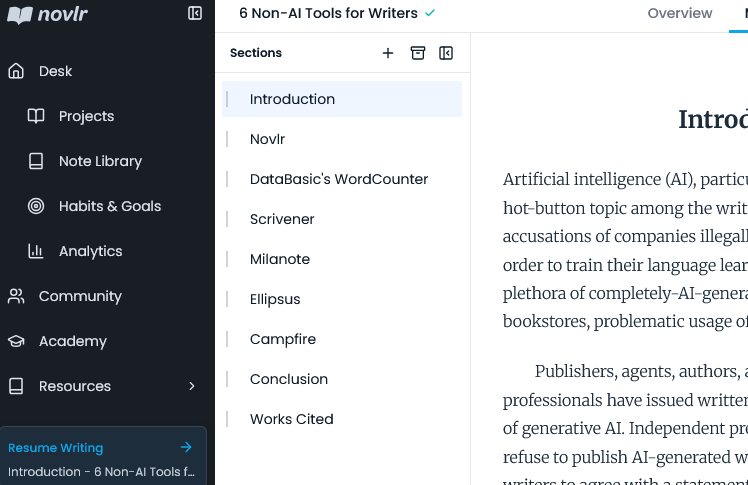
Novlr has the ability to divide documents into sections and subsections, so you can split your manuscript into individual chapters or scenes. This helps with individual chapter word count data, plus it creates a handy table of contents to jump back and forth with.
Exporting the full document from Novlr is quick and easy. You also have the option to share a link to your work with others.
Novlr is (as of this article’s publication date) still in beta testing, which means it is coming out with new features regularly. Check the roadmap to see what’s up-and-coming or even suggest your own ideas for future features!
2. WordCounter
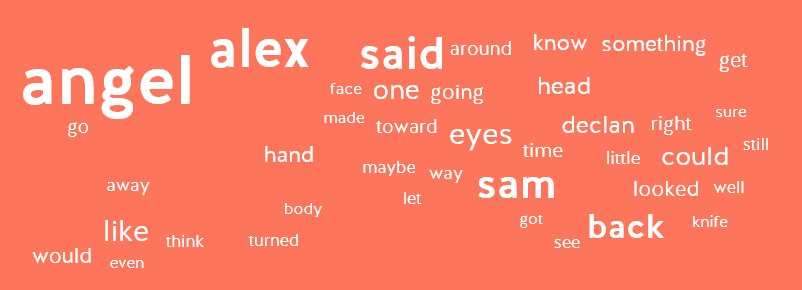
DataBasic has several (free!) tools that can be handy for writers, but we’re going to focus on WordCounter for this list. With this online tool, you simply add a file or paste in text, and it generates a table of the most-used words and phrases (2- and 3-word phrases). It also creates a word cloud, in case you’re into visuals!
WordCounter skips basic words like “the” and “to,” showing you important repeated terms and phrases. This is crucial for writers to see what words they use (too) often. You might just find that you’re overusing “just” or “back” or “gaze” (GUILTY!).
I confirmed with the DataBasic crew that they do not use AI in any of their tools, so you can rest assured you’re not feeding your manuscript into an LLM.
Here’s the word cloud that WordCounter generated from one of my unpublished manuscripts. As you can see, the character names are largest, meaning I used them most frequently; however, “like” and “back” are pretty big, too—I definitely overuse these words in my writing! In fact, I checked with a couple other manuscripts, and those terms also landed near the top of the list. This tool has helped me become a better writer by showing me which words I tend to overuse.
3. Scrivener
Next up, let’s talk about the legends over at Literature & Latte! Scrivener is an offline writing platform with a ton of features. In fact, some people say they are overwhelmed with the sheer amount.
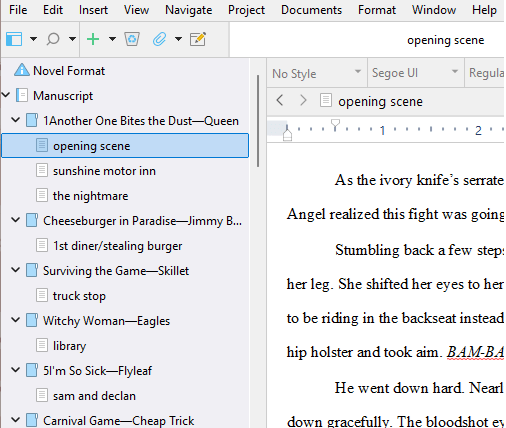
With Scrivener, you can split your manuscript into sections and subsections, create character sheets, write out a timeline, save your backstories and research, plot your entire novel, and export the full file as different types of documents, among many other things.
The great thing about Scrivener is that it’s an offline program, meaning you don’t have to connect to the web to use it. This ensures there is no AI at work! Your manuscript is safely stored on your own computer.
Now, Scrivener is not a free product—you have to buy a license—but you can download a free trial to test it out before committing. Don’t be alarmed by the many functions! There are guides to help you understand how to use the program.
4. Milanote
The next AI-free product in the list is Milanote, a quirky whiteboard app with a lot of features. Milanote is an online organizing tool that can be used for a variety of purposes, but let’s focus on just the writing tools for now.
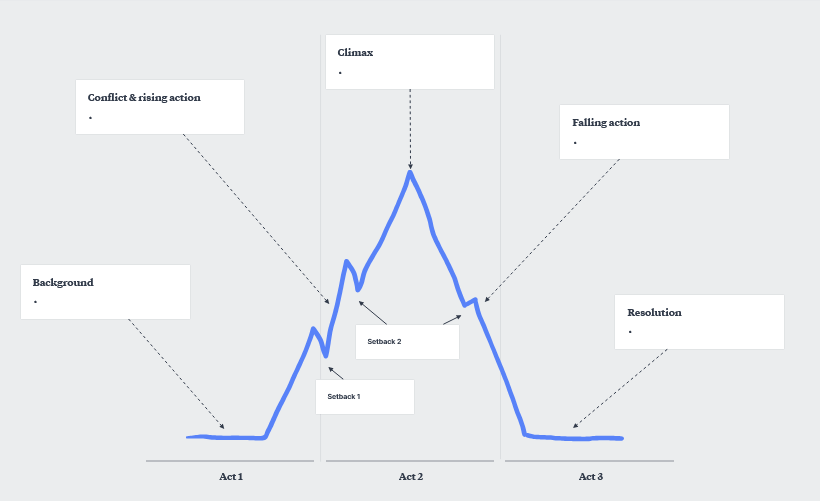
You can create a project moodboard in Milanote with images, links, videos, and text. You can visually plan and plot your novel using one of several built-in templates. There are also ready-made templates for character profiles and worldbuilding. Here’s an example of Milanote’s Three Act Structure template:
While you can create simple boards on Milanote for free, you must pay a subscription fee for unlimited access.
5. Ellipsus
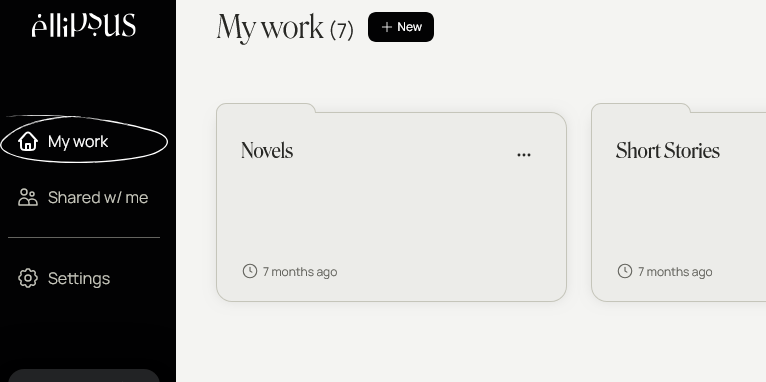
Ellipsus is another online writing platform that is staunchly AI-free. It’s called a “collaborative writing tool,” as one of its main features is being able to share drafts with other people, who can collaborate and leave comments. Ellipsus also boasts many color themes to choose from—and they’re so beautiful!
Ellipsus uses a folder system to organize individual writing files. You can easily create multiple drafts using this platform, meaning it grows with you as your manuscript develops. There are formatting options for changing headings, fonts, and styles.
The base platform is free to use; however, there is a subscription to upgrade to “Ellipsus Plus,” which offers more features and customization. Ellipsus also boasts a robust Discord community where users can interact, ask questions, and suggest features and updates.
6. Campfire
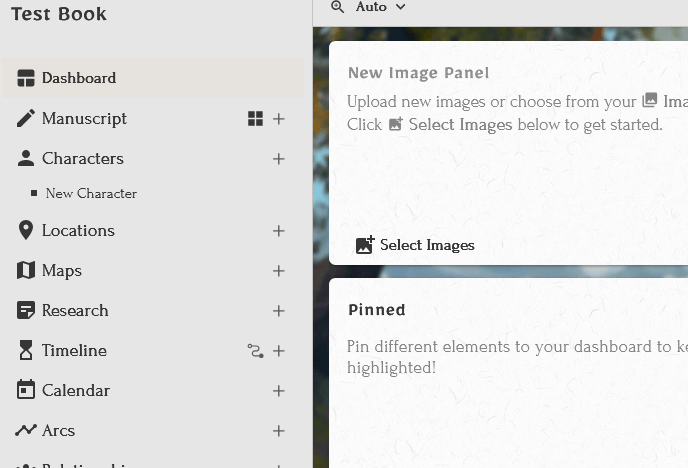
Our final AI-free tool for this list is Campfire, an online platform where you can read, write, and publish books. Its main draw is the modules feature. The writing software includes 18 different worldbuilding modules to create and fill in, such as Characters, Religions, Timeline, Magic, Languages, Research, and Arcs, along with the manuscript itself. You can even create fictional languages with Campfire!
This app encourages community and collaboration. People you share it with have the ability to read, comment on, or edit the material you create. You can also publish your work through Campfire and read others’ works.
You are able to create and store a limited amount of information in each module for free; for unlimited access, you’ll need to pay a subscription fee.
In conclusion…
As generative AI encroaches on the writing community, some companies are taking an anti-AI stance. As a writer who is against the use of generative AI in writing books, I couldn’t be happier. I hope to see more of this!
I may add to this list as I discover and try out more AI-free writing tools. Please let me know your favorite AI-free programs and tools in the comments!
A dialogue tag signifies how the dialogue is being presented and who it is being presented by. The most common example of a dialogue tag is he said. This shows who is speaking the dialogue (he) and how he’s doing it (in this case, he simply said it).
On the other hand, an action tag is an action that hints at who the speaker of the line of dialogue is but isn’t describing the way the dialogue is presented. An action tag looks like this: “Hello!” He waved. Notice that it is a separate sentence from the dialogue, but it does give a clue as to who is saying it (he) and also presenting an action (waved). He did not wave the dialogue; the dialogue was spoken and then he waved.
As a freelance editor, I see this mistake happen often in fiction writing: Someone will write a line of dialogue with an action tag that is written as a dialogue tag. For example:
“Hello,” he smiled.
This example is incorrect, because he did not “smile” the dialogue; he spoke the dialogue and smiled. He performed an action—therefore, we should use an action tag, which is a separate sentence.
“Hello.” He smiled.
Now, what complicates things is this: What if you wanted to turn it into a dialogue tag? Writers may opt to do this because “He smiled” is a bit boring and clunky. The correct way to turn an action tag into a dialogue tag is this:
“Hello,” he said with a smile. —or— “Hello,” he said, smiling.
See how it changes so that we are describing how the dialogue is being presented? Again, it’s just “said,” but that is so important because that keeps it as part of the same sentence as the line of dialogue.
Think of it this way—use the comma and lowercase if it’s part of the sentence. “He said” is not a complete sentence exactly, since it’s not telling us WHAT he said. (Grammar nerds, I know it has a subject and a verb. Don’t come after me. I’m making a point.) However, “He smiled” IS a complete sentence, right? We don’t need other information to understand that sentence.
Correct examples:
“Hello,” he whispered.
John cried out, “Oh no!”
“Stop!” the man shouted.
“That’s beautiful.” He smiled at me.
“I love this.” He picked it up for a closer inspection.
Incorrect examples:
“Hello.” He whispered.
“I love this,” he picked it up for a closer inspection.
“That’s beautiful,” he smiled at me.
So there you have it! A dialogue tag is a continuation of the dialogue’s sentence, while an action tag is its own separate sentence. You can turn an action tag into a dialogue tag by adding a dialogue tag to the action.
If you have more questions, don’t hesitate to send me a message or contact me on Instagram! If this blog post helped you understand some things, please leave a comment below and share it with your writing group!
[Context: I was asked on a recent job application to do the following: “In 500 words or fewer, write a structured argument to support your most unpopular opinion.” I now present to you my exactly-500-word manifesto:]
Use of the Oxford, or serial, comma should be mandatory in grammatically correct sentences. Opponents claim that it is a “waste of space,” “redundant,” and “unnecessary.” These individuals contend that the use of the Oxford comma should no longer be taught in schools or used in publications, calling it nonessential. On the contrary, the use of an Oxford comma is indeed essential in a sentence with listed items; it brings the sentence balance, clarity, and rhythm.
Grammatically correct sentence structure demands balance. Subjects and verbs must agree; a phrase such as “not only” should be followed by its counterpart “but also.” The Oxford comma brings balance to a sentence containing a list of three or more words or phrases by providing a comma between each listed item. Removing the serial comma unbalances the sentence structure, causing it to lump together two of the listed items. Consider the following sentence:
“I like apples, oranges, and bananas.”
Each serial item is separated by its own punctuation mark. If we were to remove the serial comma in this sentence, “oranges and bananas” would become its own phrase rather than two distinct entities in the list. Bereft of their separator, the final two listed items upset the balance of the sentence.
Let us consider another sentence—one that commonly demonstrates the clarity the Oxford comma brings:
“He met with Nelson Mandela, an 800-year-old demi-god and a dildo collector.”
Without its serial comma, the sentence implies that Nelson Mandela is an 800-year-old demigod who collects dildos. Now, let us consider the sentence again, this time with the Oxford comma in its proper place:
“He met with Nelson Mandela, an 800-year-old demi-god, and a dildo collector.”
Now the sentence is clear; the man is meeting with three distinct persons, only one of whom is Nelson Mandela.
Finally, the Oxford comma provides a soothing rhythm within a serial sentence. After each listed item is a gentle beat—a brief pause, as each comma in turn indicates. Here is an example of another sentence utilizing a serial comma:
“My favorite colors are purple, black, red, and blue.”
Try reading the sentence with a poignant pause at each comma. It sounds like this:
Purple (beat) black (beat) red (beat) and blue.
The rhythm flows; the beats line up between each listed item. Consider reading the sentence without the serial comma:
Purple (beat) black (beat) red and blue.
See how the last two items jumble up at the end, throwing off the rhythm of the sentence?
In summary, the Oxford comma is a necessary punctuation mark that balances the sentence, clarifies the meaning of each word or phrase, and perfectly captures the flowing rhythm of a grammatically correct serialized sentence. Calling for the Oxford comma to be deemed essential across all style guides may be seen as an unpopular opinion; however, when looking at the different facets and benefits of the punctuation mark, the correct answer is clear. The Oxford comma should always be used in articles, books, and journals.